From a URL we request one page, following up to 3 redirects; pasted code is checked in your browser. Each block is read, nested objects included.
Valid JSON, @context, @type and ISO 8601 dates
Required properties for BreadcrumbList, Product, LocalBusiness (and six subtypes), Event, Recipe, VideoObject and ProfilePage
Main recommended ones for Article (headline, image, datePublished, author) and Organization (name, url, logo)
When you give a URL, we request it like this:
Desktop ChromeUser-Agent
3redirects at most
10 sper request
3 MBof HTML read
Blocks are shown up to 4,000 characters; the checks use the whole block.
airankia.com/free-tools/schema-markup-generatorExample result
Validatehttps://acme.example/blog/running-shoes
2JSON-LD blocks
2Errors
2Missing recommended
Types foundBlogPostingProduct
errorBlogPosting: "datePublished" isn't an ISO 8601 date (for example 2026-10-09 or 2026-10-09T08:00:00+00:00).
errorProduct: needs at least one of offers, review, aggregateRating.
missingBlogPosting: recommended property "image" is missing.
missingBlogPosting: author should be a Person or Organization object with a name, not plain text.
Illustration with a fictional page. The messages are the validator's real output for these two blocks.
02Valid isn't shown
Markup makes a page eligible, not featured
Structured data "enables a feature to be present, it does not guarantee that it will be present", says Google, and it must describe what's visible (policies).
Product needs a name plus one of offers, review or aggregateRating
Only mark up ratings shown on the page
{ }product.jsonldExample
1{
2"@context":"https://schema.org",
3"@type":"Product",
4"name":"Trail Runner 2",
5"brand":{⋯},
9"offers":{
10"@type":"Offer",
11"price":"89.00",
12"priceCurrency"
Which validator for which job
This one, or Google's tools?
Use more than one. Ours explains and fixes; Google's Rich Results Test has the last word on rich results.
Swipe the table sideways to see all three tools →
Schema validators compared: this tool, Google's Rich Results Test and the Schema Markup Validator
Feature
AI Rankia
RRich Results Test
SSchema Markup Validator
Check a live URL
Yes
Yes
Yes
Check pasted code
Yes
Yes
11 types
What Google does with each type
Valid schema.org isn't always shown. Each card links to Google's documentation.
Paste a URL or the code. Errors first, then missing recommended properties.
URLJSON-LDHTML
02
Fix it in Generate
Pick the type and fill what you have: Google's required properties plus the main recommended ones (Person: from its ProfilePage docs). Empty fields are left out.
9:00 → 09:0090 min → PT1H30M
03
Confirm with Google
Publish it, validate the URL again, then run Google's Rich Results Test for eligibility.
Limits
What this tool reads, and what it doesn't
Reads
JSON-LD in the HTML the server sends
JSON-LD you paste, on its own or inside HTML <script> tags
The exact @type: LocalBusiness and the generator's six subtypes
The properties listed above, nested objects included
Generate and Paste code never leave your browser. No usage limit, no AI.
Your browserYou paste a URL in Validate
Validate request1/day5/day with emailNo free runs from a VPN, proxy or Tor IP; with email, yes. Resets at 00:00 UTC.
What we logURLtypes found and countsrun timeSHA-256 of IPcountryVPN flagemail, if given
Limits counted per IP hash
Country from Cloudflare
Kept with no automatic deletion
No email: VPN lookup via vpnapi.io or our own service, then ipquery.io; cached 30 min
10-minute cacheSame URL again: no new fetch, no run used. HTML isn't saved.
How to read the result
A common mistake: the author
Written as plain text. Google recommends a Person or Organization with a name and a url.
{ }Beforemissing1
1{
2"@context":"https://schema.org",
3"@type":"BlogPosting",
4"headline":"How we test running shoes",
5"author":"Jane Doe"
6}
BlogPosting: author should be a Person or Organization object with a name, not plain text.
{ }Afterok2
1{
2"@context":"https://schema.org",
3"@type":"BlogPosting",
When one block at a time isn't enough
Schema for every URL, published for you
Content Hub · Action Center
The Schema Enhancer
Inside AI Rankia, AI proposes JSON-LD for each URL, and the Enhancer puts it live.
Publishes via our WordPress plugin or a Cloudflare Worker
Before replacing it, saves the live JSON-LD (every URL on WordPress; up to 25 scanned URLs when the Cloudflare Worker is first deployed)
Checks the new markup is actually on the page
From the Brand plan ($349/mo) · 25 credits per URL scanAlso tracks your brand in 17+ AI models
If AI crawlers can't fetch your pages, none of this matters: check them first.
app.airankia.comAction Center · Schema
swipe the screenshot →
The Schema Enhancer tab for airankia.com, October 10, 2026.
FAQ
Questions people ask
What is a schema validator?
A tool that reads the structured data on a page, or code you paste, and lists what's broken or missing. This one checks JSON-LD against the properties Google documents for the types listed under What it checks; its Generate tab writes the fixed version. It can't tell you whether Google will show a rich result: Google decides that. It's for schema.org markup on web pages, not JSON Schema or XML Schema (XSD) files.
How do I validate schema markup?
Paste the URL or the code in the Validate tab and fix the errors first. Then run the published URL in Google's Rich Results Test, which also sees JavaScript-added markup and lists the rich results the page is eligible for.
Is this the same as Google's Rich Results Test?
No. The Rich Results Test is Google's own check and reads Microdata, RDFa and JavaScript-added markup; this one reads JSON-LD only, explains each problem in a sentence and writes the fix. The Schema Markup Validator checks schema.org syntax but not Google's rich-result rules (Google). See the table.
Where do I put the JSON-LD on my page?
In a <script type="application/ld+json"> tag in the <head> or <body>: Google reads both (source). Put it on the page it describes: Organization and WebSite on the home page, Article and Product on their own pages.
Is schema still relevant?
Yes for the types Google still documents, such as Product, Article, LocalBusiness, Organization and BreadcrumbList (desktop only since January 2025). FAQPage and How-to no longer produce rich results (changelog).
Does schema markup help with AI search?
Schema won't tell you if AI names your brand
The free scan asks AI engines your buyers' questions, then shows whether they name you, who they name instead and which sources they cite.
Free · live in ~30s · no credit card, no signup to see it
Every property: no foundingDate or vatID fields, and no check that an Article has a dateModified or an Organization an address
AI assistants: Google says schema "isn't required for generative AI search" (guide)
4"headline":"How we test running shoes",
5"author":{
6"@type":"Person",
7"name":"Jane Doe",
8"url":"https://acme.example/team/jane"
9}
10}
1Fix errors first. Invalid JSON, no @context or @type, a missing required property, or a date that isn't ISO 8601. On types with required properties (Product, Event, Recipe…) a missing one costs eligibility; Article has none in Google's docs. Missing recommended ones are warnings.
2On an Article, fix author, image and dates. Google's docs ask for an image of the article (not a logo) and ISO 8601 dates with a time zone.
3Only mark up what visitors see. A hidden rating or FAQ breaks Google's policies; a manual action removes rich-result eligibility.
4No blocks found? It may be added by JavaScript: try the Rich Results Test. The old Structured Data Testing Tool became the Schema Markup Validator (syntax only).
Example. The warning is the validator's own text; "After" is the generator's output.
Google says its AI features don't require structured data or any special markup, though it recommends it for rich results (source). We know of no published evidence that schema makes ChatGPT or other assistants cite a page, so we don't promise it.
Pricing
Content Hub, with the Schema Enhancer, from the Brand plan at $349/month.
 AI Rankia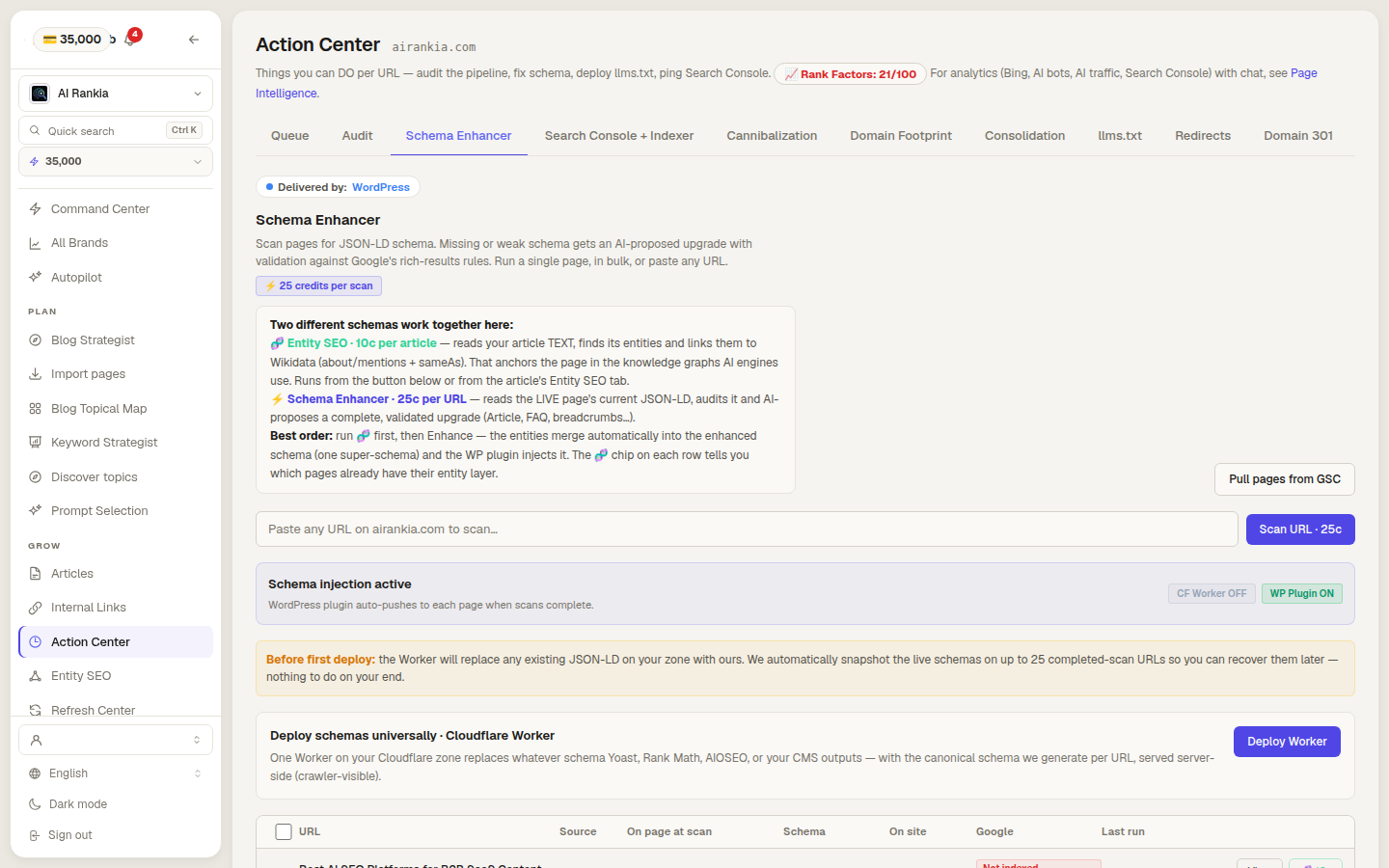
 AI Rankia