 AI Rankia
The schema markup tool that fixes your site and puts it live
Schema markup for whole sites, up to 50 URLs per run instead of one page at a time. Content Hub reads the JSON-LD on your live pages, lists what's wrong and has AI propose a complete block. Then it publishes it through WordPress or Cloudflare, and checks it's really there.
Just want to check one page or a snippet now? Our free schema validator does it, no account. The Schema Enhancer is for whole sites, inside Content Hub (from Brand, $349/mo).
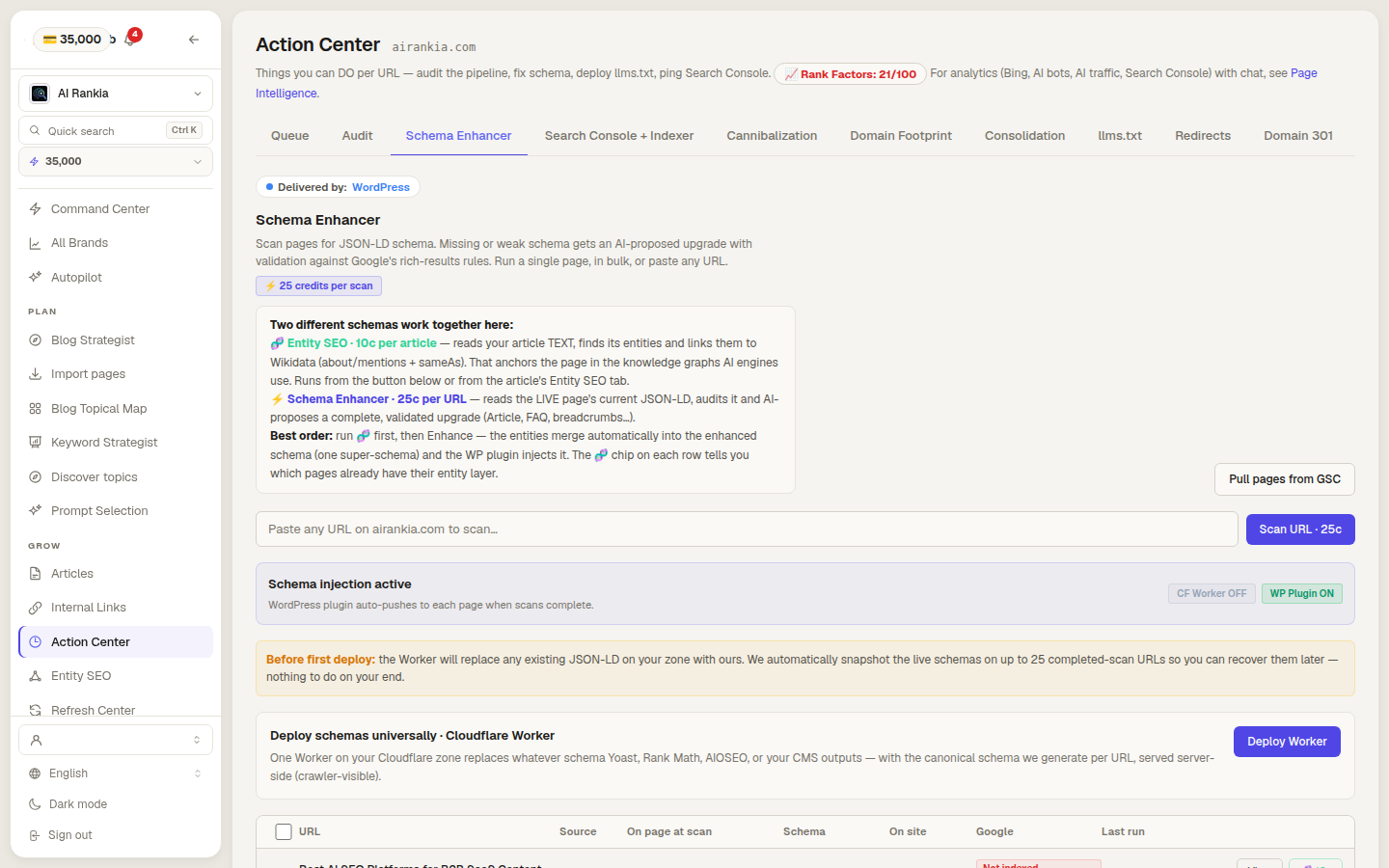
Checks cost no credits. Fixing costs a scan.
Credits come with a paid plan: the Schema Enhancer is part of Content Hub, included in Brand ($349/mo), Autopilot ($899/mo), in the Agency plan for every client brand, and in Enterprise. Outside a plan, the free schema validator checks one URL or snippet.
Validate, fix, publish, check again
Scan the live page
We read the JSON-LD already on the URL and list what’s wrong or missing.
Get a proposed block
AI writes a complete block with its reasons and action items. On a Content Hub article, our validator checks it too.
Publish, then verify
It goes out through your channel. One click fetches the page and confirms it’s served.
From a broken block to one that's live
Current and proposed schema, side by side
Every scan keeps what the page had and what AI proposes, with the rationale, the action items and the issues found in the current schema, by severity.
- One page, a bulk run, or any URL you paste
- Real author from your profile, not the WordPress login
- Copy the HTML if you publish by hand
Current
{
  "@context": "https://schema.org",
  "@type": "BlogPosting",
  "headline": "A beginner’s guide to technical SEO",
  "author": "admin",
  "datePublished": "October 3, 2026"
}
Proposed
{
  "@context": "https://schema.org",
  "@type": "BlogPosting",
  "headline": "A beginner’s guide to technical SEO",
  "image": "https://example.com/img/technical-seo.png",
  "datePublished": "2026-10-03T09:00:00+02:00",
  "author": {
    "@type": "Person",
    "name": "Jane Doe",
    "url": "https://example.com/about/jane"
  },
  "about": {
    "@type": "Thing",
    "name": "Search engine optimization",
    "sameAs": "https://www.wikidata.org/wiki/Q180711"
  }
}Our rules, Google’s verdict, the live page
On any scanned URL, a fetch of the page says if it's served and Search Console says what Google detected, rich results included. On a Content Hub article, our validator also applies Google's required and recommended properties.
- No credits, no AI
- Google’s verdict on any scanned URL, with Search Console connected
- Our rules: on Content Hub articles
- On articles, names who wrote the schema already there: Yoast, Rank Math, AIOSEO…
- Links to Google’s test and the Schema.org validator
Is it correct?
Google judges the version it last crawled; for the page as it is right now, use the Google test.
Is it on your website?
One channel per brand, never two
Only the URLs it manages change
People, tools and concepts linked to Wikidata
aboutmentionsWikidata sameAsSchema for new Autopilot articles
Where your schema ends up, and who reads it
Our WordPress plugin, the Cloudflare Worker and a pasted block all put the JSON-LD in the HTML your server sends. Our JS code adds it in the browser instead.
- WordPress plugin · Cloudflare Worker · Copy HTML or Google DocInjected into the <head> by our plugin, at the edge, or pasted into the page by you✓Yes in the HTML the server sends: any crawler that fetches the page gets it. A pasted block counts only if it goes into the page template, not through a tag manager
- JavaScript codeAdded in the visitor’s browser✗No in the HTML the server sends: only crawlers that run JavaScript see it
 Google renders JavaScript and reads what it adds (Google).
The crawler pages of OpenAI, Anthropic and Perplexity don't say whether they run it (read October 10, 2026).



What it does, and what it doesn't
- ✓Does: Its “is it live?” check reads the JSON-LD in the HTML your server sends.
- ✗Doesn't: See schema added by JavaScript in that check: for that, Google's Rich Results Test.
- ✓Does: On Content Hub articles, checks Google’s rules for the common types: Article, Product, LocalBusiness, Event, BreadcrumbList, VideoObject, Recipe…
- ✗Doesn't: Check every schema.org type. Others pass without rules: try the Schema Markup Validator.
- ✓Does: Audits the schema the page has now, then writes a complete proposed block with AI, with its reasons and action items. Our validator checks blocks on Content Hub articles.
- ✗Doesn't: Promise a rich result. Google: markup “does not guarantee” one (policies).
- ✓Does: Shows Google’s rich results verdict through Search Console for any scanned URL and on articles, if Search Console is connected.
- ✗Doesn't: Show it in real time: Google judges the version it last crawled.
- ✓Does: Publishes through one channel per brand: WordPress, Cloudflare, JS code, or by hand.
- ✗Doesn't: Push to WordPress on its own unless you switch auto-push on for that domain.
- ✓Does: Before a WordPress push, tries to snapshot the JSON-LD the page served.
- ✗Doesn't: Make AI assistants cite you. Google: structured data “isn't required for generative AI search” (guide).
Four schema checkers, four different jobs
Google’s two free testers check one page at a time; Search Console’s rich result reports cover your whole site, also free. Use them: Google calls the Rich Results Test and Search Console “the best tools” to check markup for Search.
| Feature | AI Rankia Schema Enhancer | Rich Results Test (Google) | Search Console reports (Google) | Schema Markup Validator (schema.org) |
|---|---|---|---|---|
| Checking | ||||
| Checks JSON-LD syntax | Yes | Yes | Yes | Yes |
| Checks Google’s rules per type | Common types, on Content Hub articles | Yes | Rich result types it reports on | Not found advertised |
| Test a code snippet | In our free generator | Yes | Not found advertised | Yes |
| Many URLs in one go | Up to 50 per run | One per test | Every crawled page with that markup | One per test |
| Fixing | ||||
| Proposes new markup (AI) | Yes | Not found advertised | Not found advertised | Not found advertised |
| Publishes it on your site | WordPress, Cloudflare, JS code | Not found advertised | Not found advertised | Not found advertised |
| Confirms it’s live afterwards | Yes | Re-run the test | Start validation; Google recrawls | Re-run the test |
| Price | Paid plan with Content Hub; 25 credits per scan, checks 0 | Free | Free | Free |
Yes advertisedNot found advertised not found advertised
Checked on on each vendor's public pages and docs. ✗ means we did not find it advertised on that date, not that it does not exist.
Google, on the schema.org validator: it checks syntax and schema.org compliance and “will no longer check for Google Search rich result types” (source).
What does a schema markup checker do?
Is Google’s Structured Data Testing Tool still available?
Is there a free schema markup generator and validator?
Where do I put JSON-LD on my site?
<script type="application/ld+json"> tag on the page it describes (Google). With Content Hub, the WordPress plugin or the Cloudflare Worker adds it; elsewhere, copy the block or send the Google Doc.Does schema markup help with AI search?
Where is the Schema Enhancer in AI Rankia?
Fixed markup is half the job. Do AI engines name you?
The free scan asks AI engines your buyers’ questions: do they name you, who instead, and which pages they cite. No signup.