Paste your Search Console rows with query and page, or a list of URLs and searches. See which searches several of your URLs compete for, how they split the impressions, and what to do about each one.
Your rows are read on our server and the result stays cached for 10 minutes under a fingerprint of the text, not the text. We log a hash of your IP and your country to enforce the daily limit, plus counts: lines pasted, rows read, searches found, how many came out cannibalized, to watch or same page, whether the rows had clicks or impressions, and any error code. Never your searches or URLs. No AI: a fixed rule, explained below.
Cannibalization is one search answered by several pages, so each row needs both. Clicks, impressions and position are optional, and they make the verdict possible.
query and page), a Looker Studio table, or a spreadsheet add-on built on that API.Query · Page · Clicks · Impressions · Positionhttps://yoursite.com/crm, best crmQueries.csv Pages.csvComma, semicolon or tab; header in English or Spanish, or none. Numbers like 1,234 or 3,4 are read as you'd expect.
Same search regardless of case and spacing. Rows that repeat (by date, country, device) are added up; a #fragment counts as the same URL.
From the share of impressions the second URL gets (clicks if there are no impressions): 30 % or more is cannibalized, 10–30 % is one to watch.
Searches come sorted from most to least serious, then by impressions. Each one shows its URLs, their share, and one concrete next step.
When every URL for a search differs only by http/https, www, a trailing slash or tracking parameters (utm_*, gclid, fbclid, srsltid), that search gets its own verdict, whatever the split, and isn't counted as cannibalized. That's a redirect or canonical fix (Google), not a content one.
Google aggregates the rows by page when you group by page, but counts two results from one site as one impression in property totals (source). Shares here are of the URL rows.
We mark the URL with the most clicks. Keep the one that best fits the search intent and converts, even if it has fewer clicks today.
The 20-impression floor is the one Content Hub, AI Rankia's content product, uses before it counts a search as shared by two pages. The 30 % and 10 % lines are this tool's own.
An export with a row cap leaves out the long tail. We read up to 400,000 characters and 60,000 rows, and list the 300 most serious searches with several URLs.
“best crm” and “best crm software” are two searches. We don't group by meaning.
Rows with dates are added up, so URLs taking turns week by week look like a split, not a swap.
No titles, content or canonicals are compared: the verdict comes from the numbers alone.
The 20-impression floor needs an impressions column. With clicks only, shares come from clicks and 1 click against 1 click reads as a split.
Your brand is the name of your most common domain, if it has 4 or more letters, and it counts only as a whole word: “acme login” or “ac me login” is brand on acme.com, “acmecrm” isn't, and “affordable suv” isn't brand on ford.com. A brand name that is also an everyday word (apple, shop) still marks every search with that word as brand.
utm_*, gclid, gbraid, wbraid, fbclid, msclkid and srsltid don't change what a page shows, so we drop them. Any other parameter (?id=, ?p=, ?page=2, ?lang=) can pick the content, so those URLs count as different pages. If yours don't, they'll read as competing pages: check before you merge anything.
We don't know which domain is yours. If the export holds other sites' URLs (or your own subdomains), like a rank tracker or SERP export, they're counted as competing with yours, and we warn when the rows hold more than one domain.
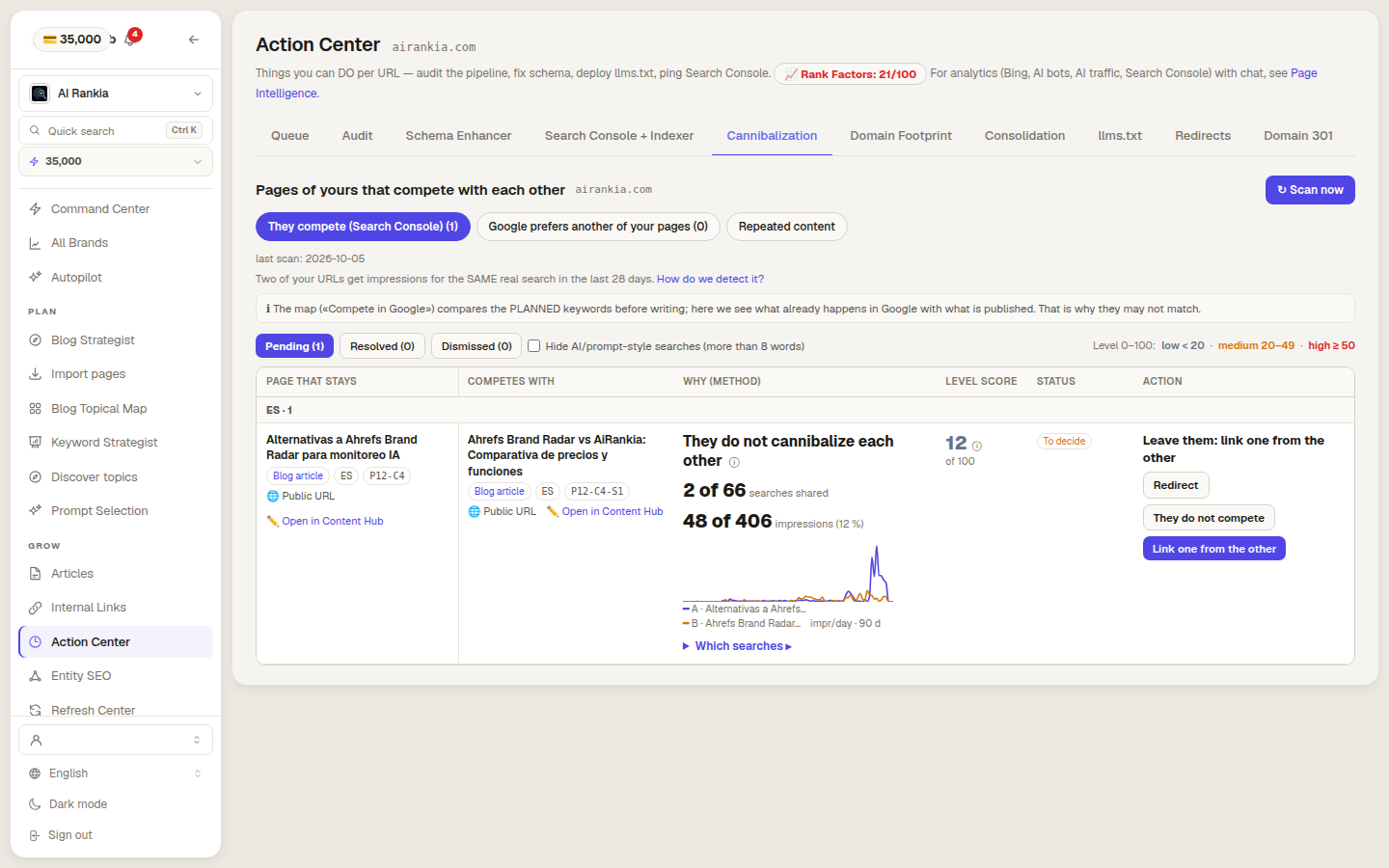
The Cannibalization tab of the Action Center pulls 28 days of query and page data from Search Console, compares your pages in pairs, and acts from the same row.
AI Rankia runs your tracked prompts on AI engines with live web search and shows whether they mention or cite you, and which pages they cite instead.
In the Search Console interface you can check one search at a time: filter the Performance report by that query and open the Pages tab.
Each URL's average position in that search, weighted by impressions when rows repeat. Google: in the table, the position is "for the specific URL" of the row (source).
 AI Rankia