 AI Rankia
A keyword cannibalization report built from your real Google searches
Content Hub reads your Search Console, finds searches where two of your pages show up, and says with a number whether they really compete, and what to do about it.
The free checker needs no account: paste Search Console rows with query and page (from the API or Looker Studio), or a list of URLs and searches. The standard Performance export alone won't do. Search Console
 Google top 10Your page text
Thresholds you can check
Source for all four: Content Hub code, Oct 10, 2026.
From two URLs on one search to one decision
Several of your pages on one search is not always a problem. The scan measures how much they really overlap.
Read Search Console
Every search with 2+ of your URLs in the top 20 over the last 28 days.
No brandSame languageMeasure the overlap
One row per pair: shared searches, shared impressions and a 0–100 level.
20+ impressions per searchDecide, and record it
One recommendation per pair. You redirect, queue an internal-link suggestion, or mark that they don’t compete.
Nothing changes without a click
Three signals, one tab
A verdict with the number behind it
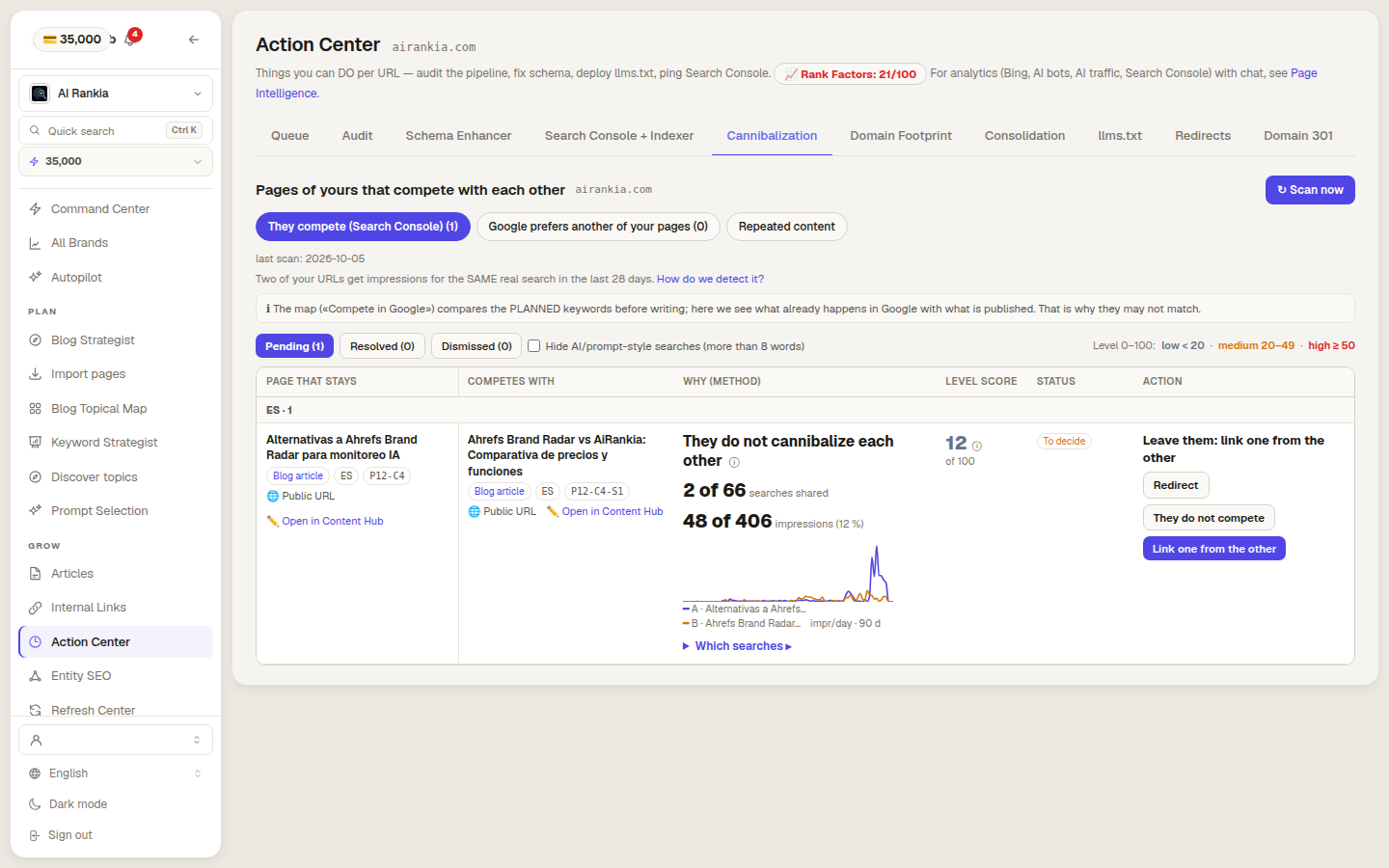
The level is the share of both pages’ impressions that come from searches where both appear. Under 15 %, leave them. From 40 %, and if Google already picked a winner, redirect.
- “Which searches” lists every shared query, with a 90-day chart per page
- Prompt-style searches (9+ words) can be hidden from the list
Share of the two pages' impressions that come from searches where both appear
- They do not cannibalizeSuggest a link from one to the other
- Keep an eye on themCheck again in 4 weeks
- They cannibalize each otherRedirect the loser to the winner
From 40 % it is cannibalization only if Google already picked one: the other gets under 30 % of the shared impressions. Otherwise, keep an eye on them. Searches count from 20 impressions; a pair whose shared searches are all long prompts never goes past “Keep an eye on them”.
When the right page doesn’t even show
For each article’s main keyword we read the Google top 10 already saved. If another of your pages shows up, especially when the article’s own doesn’t, the row tells you which one Google chose and where each one sits.
- Recommends redirecting it, or changing the article’s keyword
- No extra credits: reuses the top 10 already saved for your topical map
- 1competitor-a.com/guide
- 2competitor-b.com/blog/how-to
- 3yoursite.com/blog/older-postYours, another page
- 4competitor-c.com/review
- 5competitor-d.com/list
Pages that say the same thing
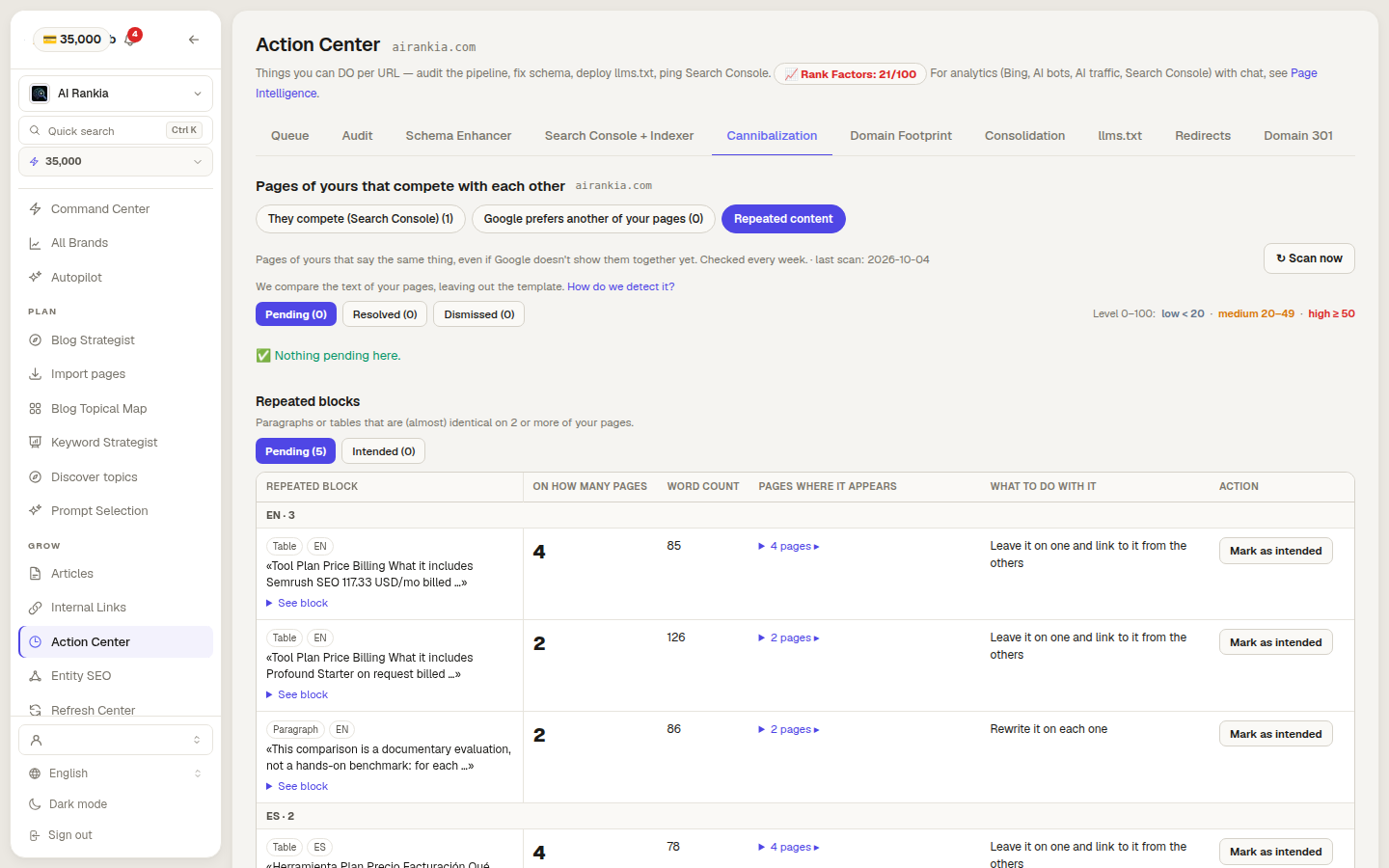
We strip the template that repeats on every page, then measure how much of one page’s own text is in the other. From 25 % it counts as a copy, and so does a shared, near-identical block of 300+ words. Recomputed every week.
- Repeated blocks too: the same table or paragraph on 2+ pages
- “See the parts that are copied” shows the exact passages
Redirects that check first
“They do not compete”, with a reason
Translations are never merged
Planned topics, checked in the map
What it can’t tell you
- !It needs Search Console. Without it connected, the main signal stays empty. Only Google knows which of your pages show up for each search.
- !Small sites see little. A search needs 20+ impressions in 28 days and two of your pages in the top 20 to count.
- !Up to 200 groups per scan. It reads the first 20,000 rows (search × page) that Google returns, in its default order, by clicks; only then keeps the 200 searches with the most impressions. A very large site sees its top 200, not every overlap.
- !It proposes; you decide. Nothing is redirected or merged without a person clicking it.
- !Linking needs a Content Hub article. “Link one from the other” queues an internal-link suggestion that you apply in Internal Links. One of the two pages must be a Content Hub article with text; otherwise you add the link by hand.
- !Redirects only on your brand’s sites. The domain must be one of the brand’s, from its topical map or its articles. Any other site is refused.
- !Brand searches are skipped on purpose. Detected by your domain name. A brand name that differs from the domain can slip through.
- !The other signals need Content Hub articles. “Google prefers another page” uses the top 10 saved for each topic of your map. “Repeated content” compares your published Content Hub articles, and your other pages only if the internal-linking inventory has them.
- !It won’t fix a weak page. Merging two thin pages gives you one thin page. The verdict is about overlap, not quality.
Ways to find keyword cannibalization
| Feature | AI Rankia Content Hub | Semrush Position Tracking | SEOTesting | Ahrefs | Surfer | Search Console by hand |
|---|---|---|---|---|---|---|
| Finding it | ||||||
| Where | Action Center → Cannibalization | Cannibalization Report, by pages or by keywords | Keyword Cannibalization report, requested on demand | Site Explorer, “Multiple URLs only” filter | Cannibalization Report, in its Topical Map | Performance report, query then pages |
| Data it reads | Search Console, 28 days, your top 20 | Your tracked keywords, Google top 100 | Your Search Console clicks and impressions | Its Organic keywords report for your domain | Search Console, connected to its Topical Map | Search Console |
| Brand searches left out | Automatically | Not mentioned | An option when you create the report | Not mentioned | Its guide says brand is normal | You filter them |
| Says when two URLs are not a problem | Verdict + 0–100 level per pair | Any 2+ pages in the top 100 count; a health score gives the % of keywords without it | Highlights URLs above a click or impression % you set | Check the SERP and history by hand | Three conditions to check by hand | Not found advertised |
| Shows the case where your right page doesn’t rank | From the saved top 10 | Not found advertised | Not found advertised | Not found advertised | Not found advertised | Not found advertised |
| Compares page text | Copied % and repeated blocks | Site Audit duplicate content check (85 % similar) | Not found advertised | Site Audit duplicates report (“Similar” content) | Not found advertised | Not found advertised |
| Fixing it | ||||||
| Applies the redirect | Cloudflare or WordPress plugin, after a conflict check | Not found advertised | Not found advertised | Not found advertised | Not found advertised | Not found advertised |
| Fix it recommends | Redirect, link suggestion, or watch, per pair | Consolidation or content refinement | Merge, internal links or canonical tags | Consolidate and redirect | Canonical, merge, links, on-page, noindex | Up to you |
Yes advertisedNot found advertised not found advertised
Checked on on each vendor's public pages and docs. ✗ means we did not find it advertised on that date, not that it does not exist.
- Semrush — Position Tracking Cannibalization Report ↗
- SEOTesting — Keyword Cannibalization Report ↗
- SEOTesting — home page (Search Console data) ↗
- Ahrefs — Keyword cannibalization ↗
- Semrush — Duplicate content in Site Audit ↗
- Ahrefs — Duplicates in Site Audit ↗
- Surfer — Keyword cannibalization ↗
- Google — Performance report ↗
How we checked · 8 sources
AI Rankia column: what the Content Hub code does on the date above. The others: what each linked page says. Semrush’s and Ahrefs’ duplicate checks are Site Audit crawl reports, separate from their cannibalization report and guide. Ahrefs and Surfer are guides (Surfer’s points to its own report); Semrush and SEOTesting are dedicated reports. Sitechecker, Ryte and writetext.ai also rank for this search and are not in the table.
- Semrush — Position Tracking Cannibalization Report ↗
- SEOTesting — Keyword Cannibalization Report ↗
- SEOTesting — home page (Search Console data) ↗
- Ahrefs — Keyword cannibalization ↗
- Semrush — Duplicate content in Site Audit ↗
- Ahrefs — Duplicates in Site Audit ↗
- Surfer — Keyword cannibalization ↗
- Google — Performance report ↗
Questions people ask
What is keyword cannibalization?
How do I find keyword cannibalization?
Is ranking with two pages for the same keyword bad?
How do you fix keyword cannibalization?
Is there a free keyword cannibalization checker?
See which of your pages compete
Create your account, connect Search Console and run the scan from the Action Center. Content Hub is included from the Brand plan ($349/mo).
- 2 of 66 searches shared
- 48 of 406 impressions (12 %)