 AI Rankia
Internal linking tool: suggested links you approve, placed for you
Content Hub finds sentences in your articles that already talk about another of your pages and suggests the words to link. You approve; the link goes into the live WordPress post, or comes to you as HTML.
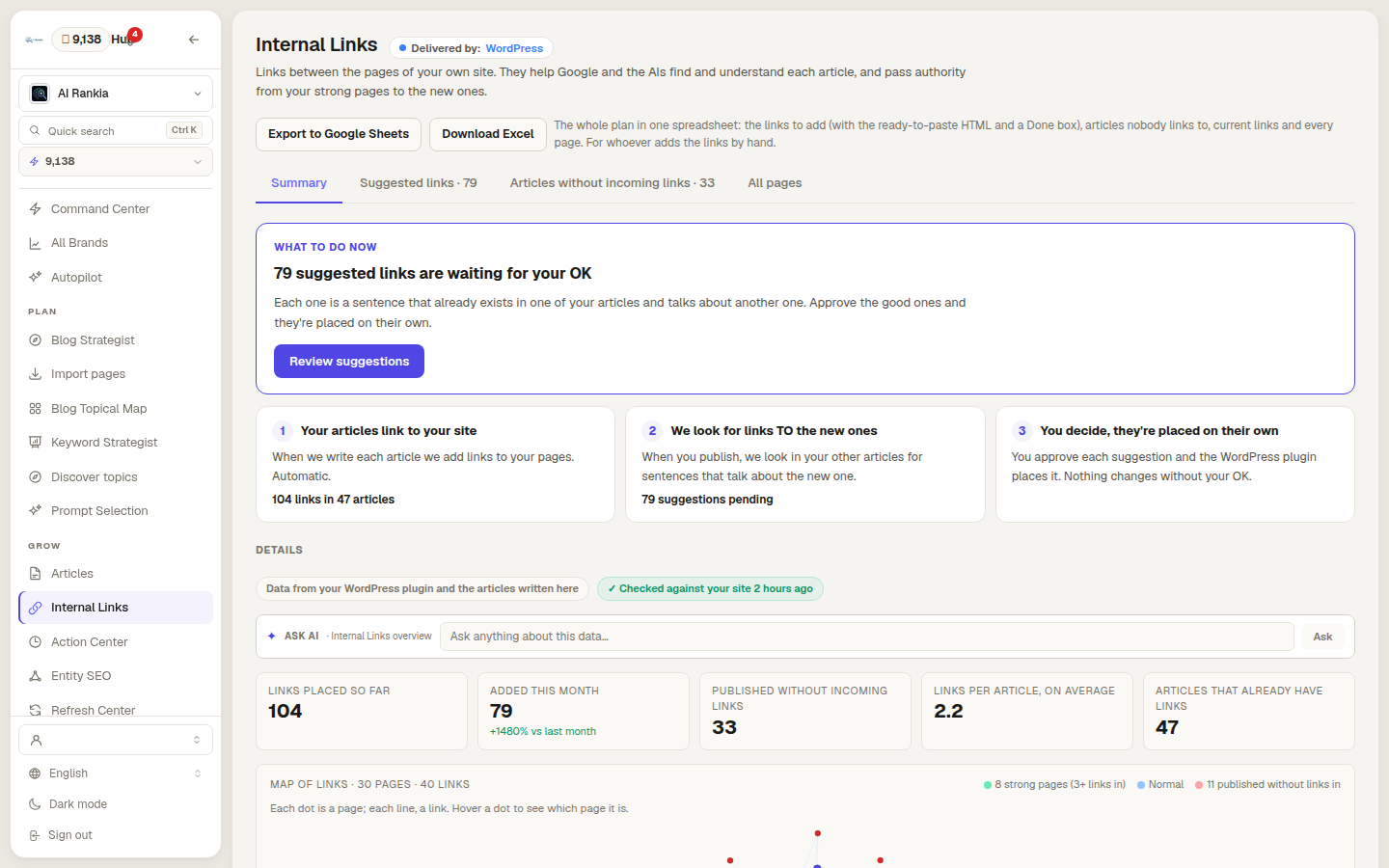
Three steps, and the last call is yours
Your articles link to your site
Each Content Hub article ships with links to your pages. Automatic.
We look for links to the new ones
Once an article is published, we search your other articles for sentences about it.
You decide, then it’s placed
Approve, edit or discard each suggestion. Nothing changes without your OK.
Approving a link costs nothing
Internal linking is part of Content Hub, included in Brand ($349/mo) and Autopilot ($899/mo), and in the Agency plan for every client brand.
From a sentence you wrote to a live link
Matched by meaning, paragraph by paragraph
Passages are compared by meaning, so a section on “AI crawlers” can match a page about “LLM scrapers”.
- Never a page in another language
- Targets answering 404 or 410 are dropped
- Pages nothing links to get a bonus
- Strong page (3+ links in)
- Normal
- Published, nothing links in
- Suggested, waiting for your OK
The anchor comes from your own sentence
The clickable words come from the matching paragraph, word for word. You see the sentence, the target and why.
- Approve, change the words or mark it Not useful
- Reject all low-relevance ones at once
- A warning past 1 link per 200 words
- In the article
- How to plan a content cluster /blog/content-clusters/
- the words
- “topical map”
- will link to
- Topical map guide /blog/topical-map-guide/
The sentence in the article: Start with a topical map: one pillar page and the cluster articles that support it.
This article already links to 3 pages; for its length (1,240 words) it can take up to 6.
Edit the words or see why it was suggestedInto the post, at the edge, or by hand
The whole plan in one spreadsheet
Orphans and strongest pages
Weekly internal linking autopilot
The rule that writes the link, in your browser
The rule Content Hub runs on the live WordPress post, on HTML you paste. Nothing is sent.
<a> tag was added and nothing else in the HTML changed.Approximate: counts all words and same-site links; Content Hub uses the stored word count.
Before
<h2>How to plan a content cluster</h2>
<p>Start with a topical map: one pillar page and the cluster articles that support it. Each cluster article should an…
After
<h2>How to plan a content cluster</h2>
<p>Start with a <a href="https://example.com/blog/topical-map-guide/">topical map</a>: one pillar page and the cluster articles that support it. Each cluster article should an…
What it does, and what it doesn't
- ✓Does: Suggests links inside Content Hub articles, to any page of your site we know.
- ✗Doesn't: Add links inside pages Content Hub didn’t write.
- ✓Does: Suggests links to an article once it’s published.
- ✗Doesn't: Link to drafts.
- ✓Does: Writes the approved link into the live WordPress post.
- ✗Doesn't: Write into posts elsewhere: there it’s Cloudflare, the snippet or HTML you paste.
- ✓Does: Waits for your OK on every suggestion.
- ✗Doesn't: Except the weekly autopilot, off by default. Its links look like yours in the link history: no autopilot label yet. Plans: Autopilot ($899/mo) and Agency.
- ✓Does: Removes Cloudflare and snippet links from the dashboard.
- ✗Doesn't: Remove WordPress links: edit the post.
- ✓Does: Checks every night that placed links are still there.
- ✗Doesn't: Measure what a link does to rankings or AI answers. We won’t quote a percentage.
How internal linking tools place links
| Feature |  AI Rankia Content Hub AI Rankia Content Hub |  Yoast SEO Premium Yoast SEO Premium |  Link Whisper Link Whisper |  LinkStorm LinkStorm |
|---|---|---|---|---|
| Suggestions | ||||
| Suggests links for you to review | Yes | In the editor, while you write | Yes | Yes |
| Anchor taken from a sentence already in your text | Yes | You place it (drag or copy) | Yes | Yes |
| Lists pages with no internal links pointing to them | Published articles | Premium (orphaned content finder) | Yes | Pages with zero incoming contextual links |
| Placement | ||||
| Inserts the approved link for you | WordPress, Cloudflare or script | Not found advertised | Premium | WordPress plugin; Shopify and Wix apps |
| Automatic linking without per-link review | Optional weekly autopilot (Autopilot and Agency plans) | Not found advertised | Premium | Optional auto-link |
| Works outside WordPress | Cloudflare, script or manual export | Suggestions only, in the separate Yoast SEO for TYPO3 extension | Shopify app | Shopify, Wix and others |
Yes advertisedNot found advertised not found advertised
Checked on on each vendor's public pages and docs. ✗ means we did not find it advertised on that date, not that it does not exist.
In the HTML
WordPress post, Cloudflare edge or pasted HTML
- WPWordPresswritten into the post
- CFCloudflareadded before the page is sent
- </>Copy HTMLpasted by your team
Added by script
JavaScript snippet, after the page loads
 Google✓Renders JavaScript
 OpenAI?Not stated
 Anthropic?Not stated
 Perplexity?Not stated
AI crawler pages (checked October 9, 2026) don't say if they run JavaScript: for AI search, prefer HTML.
Google Search Central, on linksRead the anchor, not just the target
Anchor text: “descriptive, reasonably concise, and relevant to the page that it's on and to the page it links to”.
Start with orphans: the cheapest fix
“Every page you care about should have a link from at least one other page on your site”.
Questions people ask
Short answers, in Google's words where Google has said it. The full guide: Google's link best practices →
What is internal linking?
How many internal links per page?
How do I find the internal links to a page?
Can internal linking be automated?
How do I add internal links in WordPress?
See where your brand stands in AI answers
The free scan asks AI engines your buyers’ questions: do they name you, who instead, and which pages they cite. No signup.