 AI Rankia
Query fan-out tracking for every prompt you follow
AI engines answer one question by running several web searches. AI Rankia records the ones they report for every prompt you track, and compares each with queries from your Search Console and Bing data.
 ChatGPT
 Gemini
 Claude
 Perplexity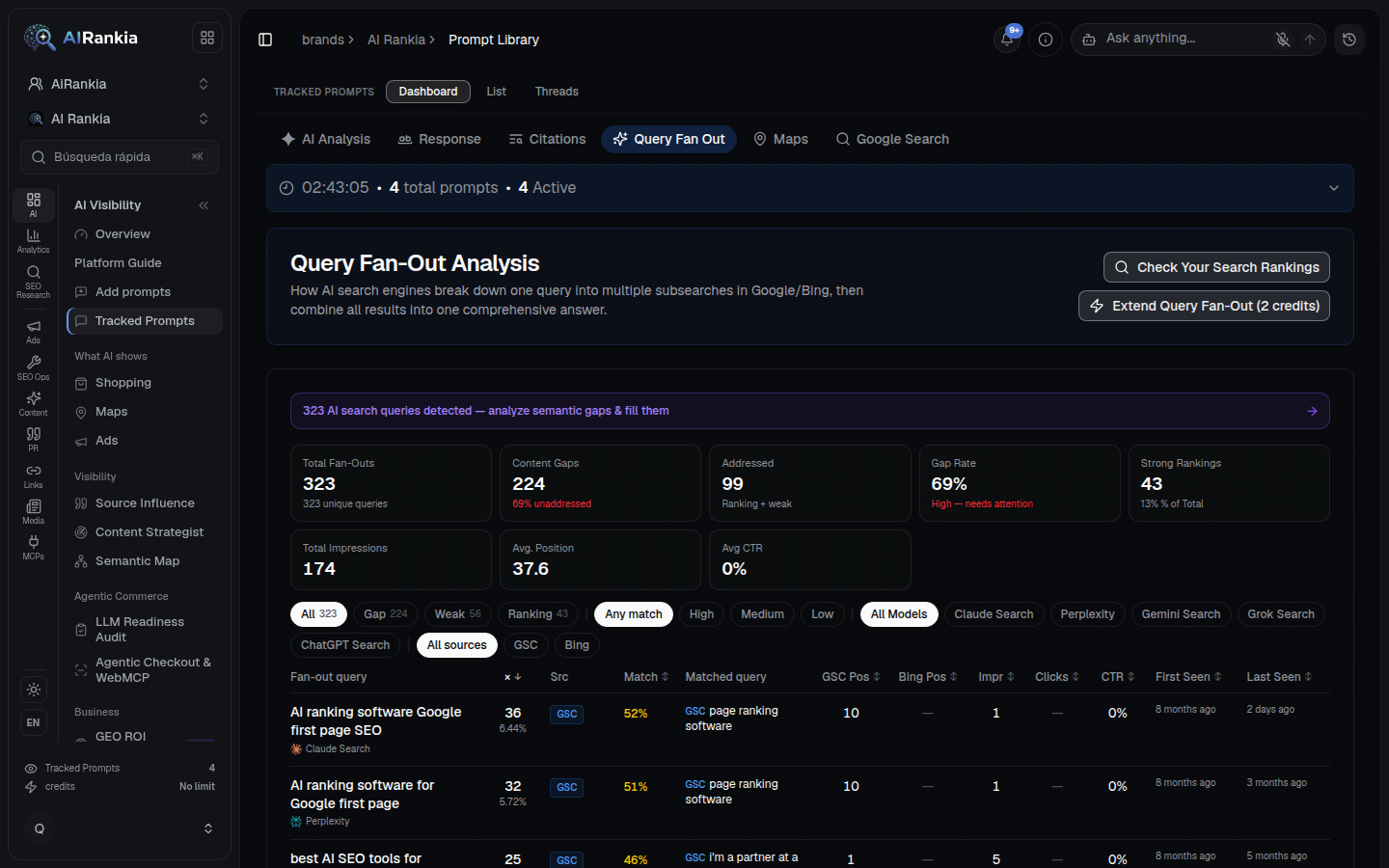
What query fan-out is
Instead of running your question as one search, an AI engine splits it into related sub-questions, searches the web for each, and writes one answer from what it finds. In Google’s words:
- Google AI Mode, May 20, 2025
“AI Mode uses our query fan-out technique, breaking down your question into subtopics and issuing a multitude of queries simultaneously on your behalf” (blog.google).
- Google Search Central guide
Query fan-out: “A set of concurrent, related queries generated by the model to request more information and fetch additional relevant search results to address the user's query” (Google).
- Why it matters for SEO
Our article explains it: The impact of query fan-out on B2B SaaS and agency SEO.
One question, hundreds of searches
From your prompt to your Search Console
No simulation: the sub-queries come from real runs of the prompts you already track.
Engines run your prompt
Each tracked prompt runs on its schedule. When an engine reports the web searches it made, we store each one with engine and date.
We match your queries
Every sub-query is compared, word by word and weighting rare words more, with the queries in up to 1,000 rows of your synced Search Console data and 1,000 rows of Bing data.
You see what is missing
Each sub-query is labelled Ranking, Weak or Gap, with position, impressions, clicks and CTR next to it.
Every sub-query, next to your data
The searches behind each answer
Open a tracked prompt and the Query Fan Out tab lists the searches the engines reported for it, how often, and when each was first and last seen.
- Filter by engine: ChatGPT, Gemini, Claude, Perplexity, plus any engine with older rows, such as Grok
- Counts show which sub-queries repeat and which appeared once
- Grouped across runs, counting the latest 1,000 searches recorded for the prompt
- AI ranking software Google first page SEO×36
- AI ranking software for Google first page×32
 best AI SEO tools for ranking on first page of Google 2026×25
- best AI SEO ranking software 2026×11
- top AI ranking software Google first page 2026×10
- Surfer SEO vs MarketMuse vs Clearscope vs Frase 2026 comparison×4
- + 317 more distinct searches
Ranking, weak or a gap
Each sub-query sits next to the closest query found in your synced Search Console and Bing data, with the match score, GSC and Bing position, impressions, clicks and CTR.
- Filter by status, match strength (High, Medium; the Low filter always comes back empty, because the matcher’s floor is 45%), engine and source
- Sort by times seen to find the gaps the engines search most
- RankingMatched a Search Console or Bing query, best position 20 or better
- WeakMatched, but the position is worse than 20 or missing
- GapNo query of yours matched at all
Extend the fan-out
Check your search rankings
Query Explorer
Fan-Out Gaps in your topical map
What this can and can’t tell you
- Only what the engine reports
We record the searches ChatGPT, Gemini, Claude and Perplexity return with their answer. Google AI Overviews and AI Mode don’t give us theirs, so they are not in this tab.
- Engines change
Grok reported searches for our prompts until April 2026 and then stopped. Which engines report, and how many searches, can change without notice.
- No Search Console, all gaps
Without Search Console or Bing Webmaster connected there is nothing to match against, so every sub-query shows as a gap.
- A match is about words, not intent
The matcher compares words, weighting rare ones more. A 50% match can be a different question. Read the matched query before acting on it.
- Matching reads at most 1,000 rows
The matcher reads at most 1,000 Search Console rows and 1,000 Bing rows per brand, so a real match can still show as a gap (example in the FAQ).
- Counts cover the latest 1,000 searches
Times seen and first seen are worked out from the most recent 1,000 searches recorded for a prompt. On prompts that have run longer, older searches drop out.
Recorded searches vs. a model’s guess
Some fan-out tools ask a language model to imagine the sub-queries. That is useful for brainstorming. It is not what the engine searched.
| Method | AI Rankia tracked prompts | Asking an LLM to simulate |
|---|---|---|
| The data | ||
| Searches the engine reports it ranA simulation is a model guessing; nothing was searched. | Yes | No |
| Per engine | ChatGPT, Gemini, Claude, Perplexity | Whatever model you ask |
| Repeats over time (first and last seen) | Yes | No |
| What you can do with it | ||
| Matched to your Search Console and BingToday: up to 1,000 rows of synced Search Console data per brand (rows, not queries); see Limits. | Partly | No |
| Into a topical map | Content Hub, from Brand | No |
| Works for any question, without tracking it | No | Yes |
AI Rankia column: what the product does today, checked in our own code on October 10, 2026. The other column describes the method, not any one product.
- Google says no special format is needed
Its guide: “There's no requirement to break your content into tiny pieces for AI to better understand it” (Google). Use the gaps to find missing topics, not to make a page per sub-query.
Questions people ask
What is query fan-out?
Does ChatGPT use query fan-out?
How can I see the fan-out queries for a prompt?
Are the fan-out queries the same every time?
Why does a sub-query show as a gap when I rank for it?
How should I read the positions and the gaps?
How do I optimize for query fan-out?
See the searches behind your prompts
Run the free scan, or create an account and track your prompts. The Query Fan Out tab comes with every plan that tracks prompts, from Monitor ($99/mo); Content Hub's Fan-Out Gaps from Brand ($349/mo).